
Bios password for Dell Latitude with: System Disable.
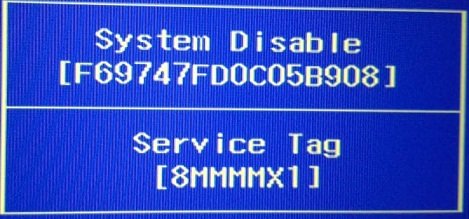
Unlock Bios Password on Dell Latitude with: System Disable, and Service tag under it, Supported models is Dell Latitude 3540.
Find here Bios Password for Dell Showing: System Disable, Service Tag, Asking to Enter: The Current Password
If you have a Dell Laptop Desktop or Notebook Asking to Enter The Current Password, Showing: System Disable, You can buy your password here, so enter your Dell System Disable code + Service Tag Code Displayed on your laptop screen and hit buy now.

Dear Customers, all Bios or Hard drive passwords will be sent by email within 5 minutes or the most it takes is 2 hours, Password will Work 100% or Your Money back!
Services are aimed to offer system disable Password for Dell:
Latitude 3540
Not all models are listed here.
Links of Dell System Disable Password by Laptop models:
Disclaimer:
Please Note: We like to think that you are unlocking your own laptop and that you know how many passwords are set,
Know that Bios Password is used to unlock the motherboard, and hard drive password unlock only hard drives,
Bios & HDD Passwords Are Sold Separately and windows password removal program is also available.
How to Reset Dell System Disable password on Dell Latitude?
You can reset the Dell System disable Bios password within bios setup.
Restart your Dell pressing F2 Every second,
Type the provided Dell Unlock code we sent you,
Go to: security
Then: passwords
Look for the option: Unlock Setup
Go to: administrator password
Then Recover the password
There will be 3 fields
Type the System Disable password we sent you in the first field
And leave the other 2 fields Blank!
Click on Save it.
Password should now be removed and your Dell Laptop will stop asking for the current password on boot.
Keywords: dell system disable password, dell latitude system disable password
Additional solution on Dell System Disable password
Remove Dell system disable password
© www.pwd4bios.com